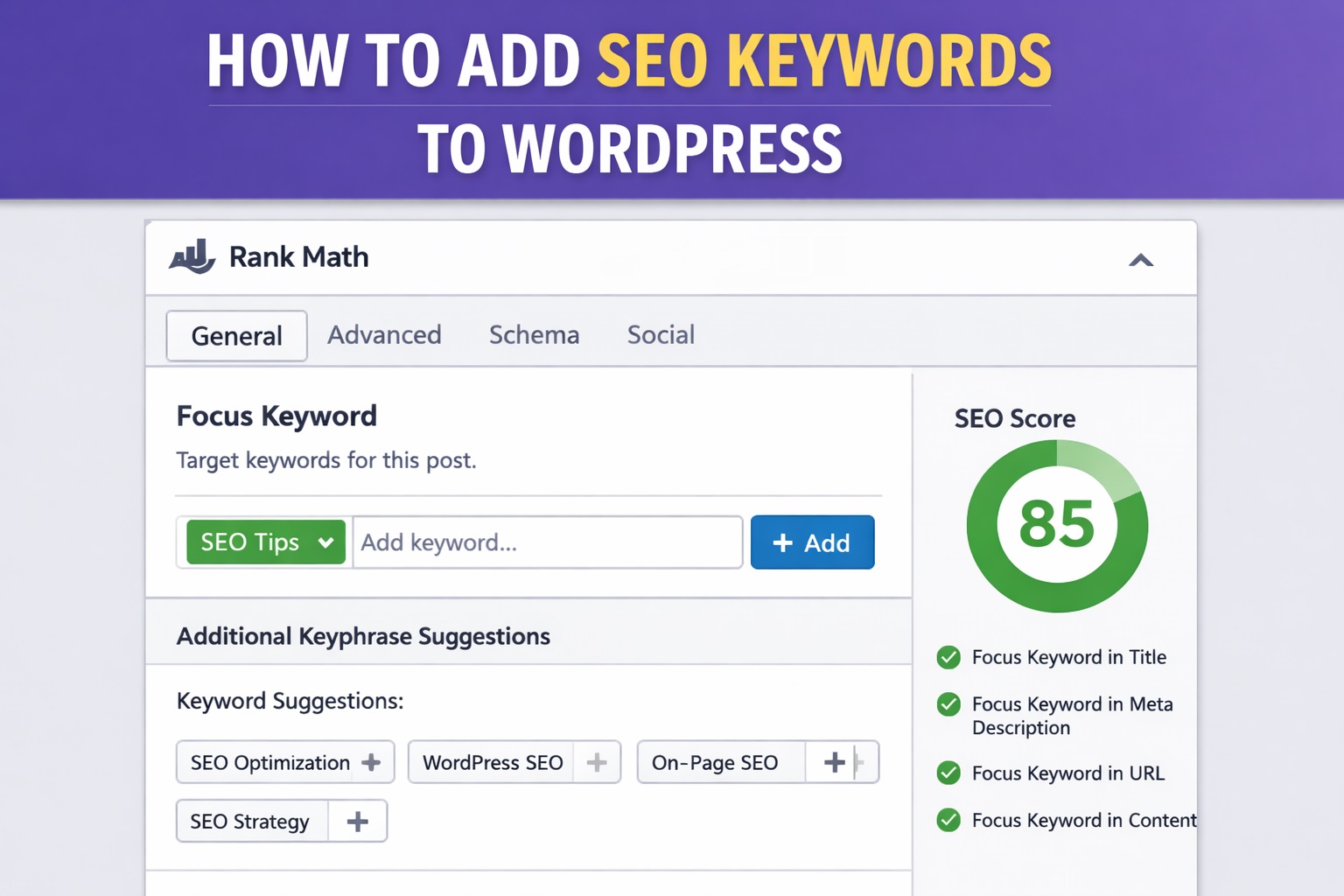
Getting your WordPress content seen on Google starts with using the right SEO keywords—and placing them effectively. Keywords help search engines understand what your content is about, making it easier for your pages to appear in relevant search results. But adding keywords isn’t just about stuffing them everywhere. It requires a strategy that balances relevance, placement, and natural flow.
WordPress makes keyword optimization straightforward, especially when using tools like Rank Math. With the right steps, you can structure your content to rank higher without compromising readability or user experience. In this guide, we’ll break down where to add SEO keywords in WordPress and how to use Rank Math to streamline the process.
Understanding SEO Keywords
SEO keywords are the search terms people type into search engines when looking for information, products, or services. Adding these keywords to your WordPress site helps search engines match your content with relevant queries, increasing the chances of ranking higher in search results.
There are three main types of SEO keywords you should focus on:
- Primary keywords: The main term your page is targeting. This should closely match the core topic of the content.
- Secondary keywords: Supporting terms related to the primary keyword. These help expand topical relevance.
- Long-tail keywords: Longer, more specific phrases with lower competition and higher intent. These often convert better and are easier to rank for.
Search engines also evaluate search intent, meaning why a user is searching for a keyword. Informational, navigational, and transactional intent all require different content approaches. Choosing keywords that align with user intent ensures your WordPress content satisfies both search engines and visitors.
Where to Add SEO Keywords in WordPress
To improve visibility and rankings, SEO keywords need to be placed in the right parts of your WordPress content. Here’s where to add them:
1. Page/Post Title
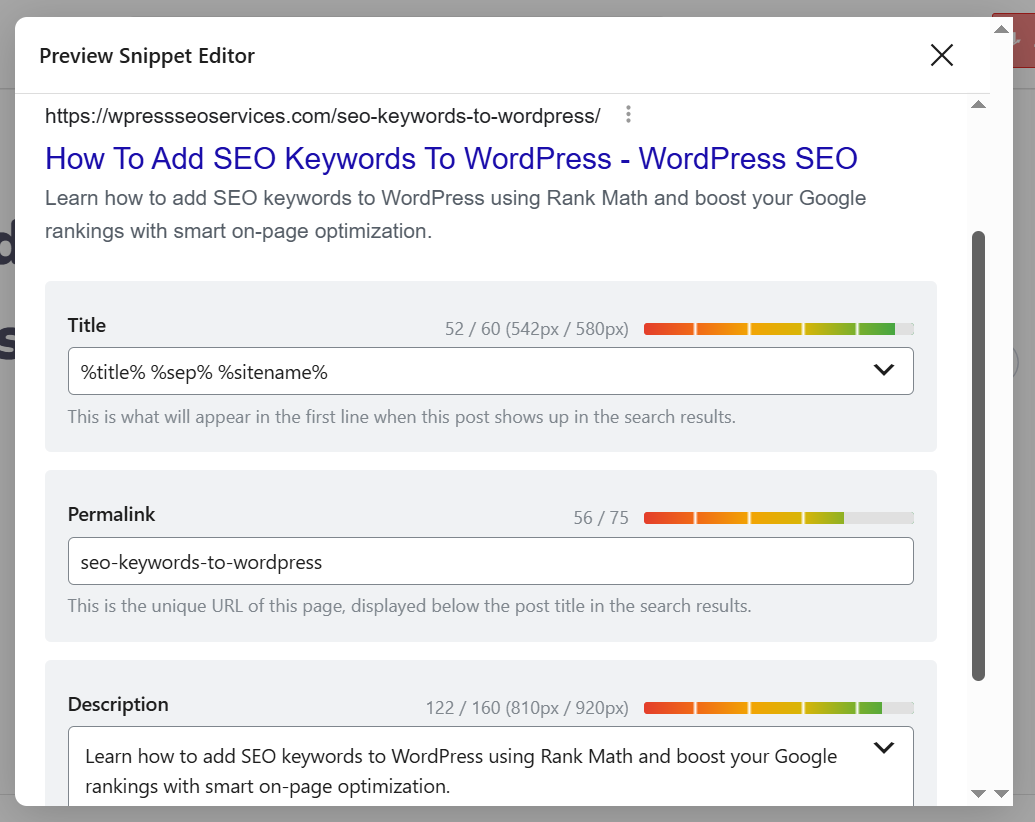
Your title is one of the strongest SEO signals. Include your primary keyword near the beginning of the title. This tells search engines—and users—what the page is about.
Example:
✅ Good: How to Add SEO Keywords to WordPress for Better Google Rankings
❌ Avoid: Better Google Rankings Using WordPress SEO Keywords
2. Headings (H1, H2, etc.)
Use keywords in subheadings to organize content and reinforce the topic. Only one H1 is used per page (usually the post title), but H2s and H3s can include secondary and long-tail keywords naturally.
3. URL Slug
The permalink or URL should include the primary keyword for better indexing. Keep it short and descriptive.
Example:yourdomain.com/add-seo-keywords-wordpress
4. Meta Description
While not a direct ranking factor, the meta description influences click-through rate. Include your main keyword and write a compelling summary within 150–160 characters.
5. Image Alt Text
Add keywords to the image alt attributes to improve accessibility and help Google understand your images. This also supports image SEO.
Example:<img src="rankmath-dashboard.jpg" alt="Rank Math SEO keyword settings">
6. Body Content
Sprinkle your primary and secondary keywords naturally throughout the content. Aim for a keyword density of 1–2%, and avoid keyword stuffing. Use variations and synonyms to keep the text natural.
Using Rank Math to Add and Optimize Keywords
Rank Math is a powerful SEO plugin for WordPress that simplifies keyword optimization. It helps you add focus keywords and ensures your content meets best SEO practices. Here’s how to use it effectively:
1. Setting a Focus Keyword
When editing a post or page, scroll down to the Rank Math section. You’ll see a field labeled “Focus Keyword.”
Enter your primary keyword here. Rank Math will then analyze your content based on this keyword and provide a score out of 100.
You can also add multiple focus keywords (if using Rank Math Pro), allowing you to optimize for secondary keywords as well.
2. Optimizing On-Page Elements
Once your keyword is set, Rank Math shows a checklist of SEO tasks. It checks if the keyword appears in key areas:
- SEO Title
- Meta Description
- URL
- First 10% of content
- Image alt attributes
- Headings (H2, H3, etc.)
Each item that’s correctly optimized gets a green checkmark. Aim to complete as many as possible without forcing keywords unnaturally.
3. Keyword Suggestions and Score Analysis
Rank Math suggests related keyword variations you might want to include, which helps improve topical relevance.
The plugin also gives you a Content AI score (if enabled) that evaluates content quality and keyword usage.
Use the suggestions to improve readability, reduce keyword stuffing, and add semantic relevance to your content.
Common Mistakes to Avoid When Adding Keywords
Using keywords correctly is just as important as choosing the right ones. Many WordPress users unintentionally hurt their SEO by making these common mistakes:
1. Keyword Stuffing
Repeating your main keyword too often makes content hard to read and can trigger search engine penalties. Aim for natural usage and use synonyms or related terms to vary your language.
Bad:
“We help you add SEO keywords in WordPress. SEO keywords in WordPress are important. Learn to add SEO keywords in WordPress.”
Better:
“Adding SEO keywords in WordPress helps improve visibility. By placing them in the right spots, your content becomes easier to find.”
2. Ignoring Search Intent
Using a keyword without matching the content to the user’s intent won’t help with rankings. If someone searches “how to add SEO keywords,” they expect a guide—not a sales pitch.
Make sure your content answers the question or solves the problem that the keyword implies.
3. Over-Optimizing Meta Tags
While it’s important to use keywords in the title and meta description, overdoing it can make your snippets look spammy. Focus on writing compelling, readable tags that include the keyword once.
Example Meta Description:
“Learn how to add SEO keywords to WordPress using Rank Math and boost your search rankings with simple steps.”
Conclusion
Adding SEO keywords to your WordPress site is a key part of improving your visibility in search results. But it’s not just about inserting words into content—it’s about placing the right keywords in the right places with purpose.
By optimizing your titles, headings, URLs, meta descriptions, images, and body content, you give your pages a better chance to rank. Tools like Rank Math make this process easier by guiding you through keyword placement and highlighting areas to improve.
When used correctly, SEO keywords help both search engines and users understand your content, leading to better rankings, more traffic, and improved engagement.